Last Updated on October 7, 2025 by
Introduction
This page will guide you on how to handle Workstations/Servers. How to value check and putaway.
Ryzen CPU PC, Custom PC single core PC, and Quad core PC refer to Custom PC OR All Other PC to Be Tested #5991
Dual core or 4th gen i series PC refers to Intel Core 2 Duo or Intel/AMD Dual Core or iSeries 4th Gen & Older PC #5984,
6th Gen or newer i-series PC refers to i-Series CPU PC 6th Gen & Newer #6002
Micro PCs refer to Micro PC #12377
All units for this category will require a value check; the sold value must be over $100 and greater than $4 per pound.
Item Examples
Workstation:
|
Server Rackmount: 
Server Tower:
|

How to Process
-
Check the machine and remove asset tags
- Check any pull-out tags.

- Check any pull-out tags.
-
Check and remove storage media
- Remove all hard drives. Leave the SD card inside for the Server.
- For newer Servers/Workstations, check for M.2 or mSATA SSDs. (Sometimes the M.2 is installed on a Goldfinger card.)
- Keep the caddy with the hard drive.
-
Remove all normal Goldfinger cards
- Do not remove the riser card for the server and workstation if good for testing.
- Do not remove the RAID card. How to identify a RAID card? Look for a Storage Media cable(SATA, IDE, SAS, etc.) that connects with it.
- Do not remove the non-gold finger card even if it is sitting in a gold finger adapter. Needed it for testing.
- Leave cards in Fujitsu Celsius workstations
- Leave the video card with the workstation.
-
Weigh the entire system without the hard drive/s.
- Round the number up.
-
Use the brand and model listed on the front of the unit
- PC Tech Level 1: How To Identify Common Model/Part Numbers
- If the bezel is missing, use the serial number to look up the model on the OEM website.
- For Supermicro Server, use the motherboard Brand and model for value check.
- Motherboard scrap value is $60 sold, $120 unsold or active.
- Value check the 2U or larger rack mount case.
- Value check the tower case.
- For the IBM Server, try the M/T number for value check if you can not find the result with the model number.
- M/T number:
- Model number:
- M/T number:
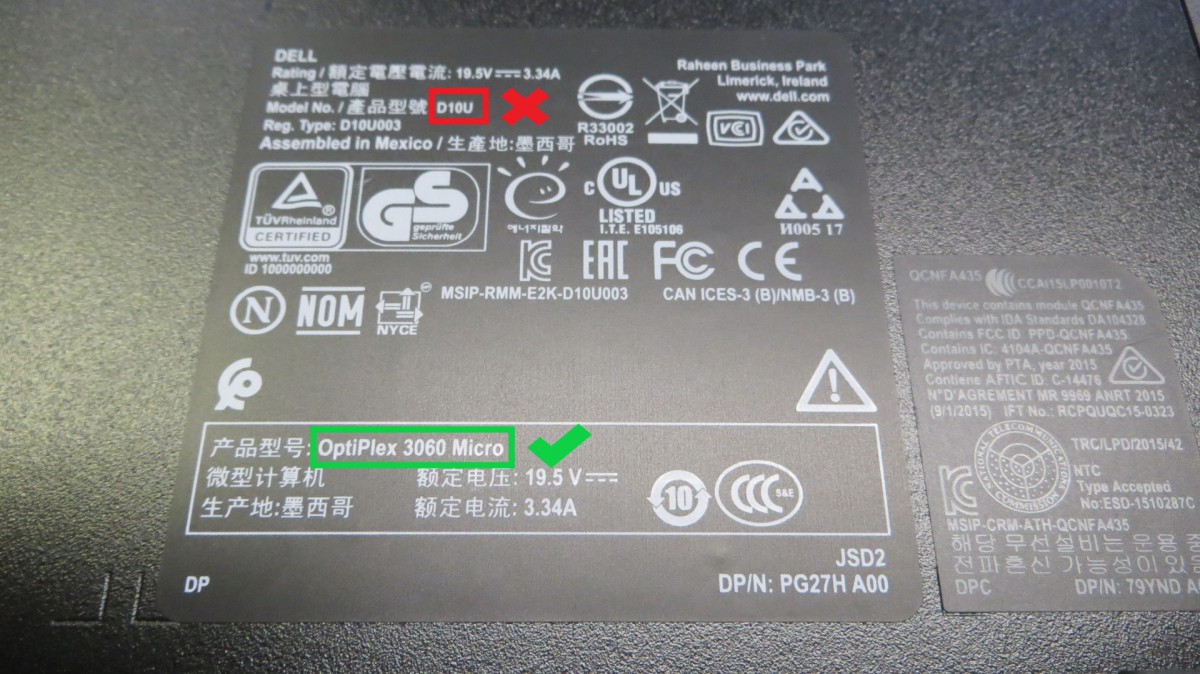
- Do not use regulatory model numbers for value checking.
-
Check the Scrap list
-
Value Check the item
- Choose the listing with the same CPU series. (I series CPU, Xeon CPU, Ryzen CPU, etc.)
- Also, look for the listing that has the same QTY of CPUs. Differnt QTY CPUs will affect the value of the unit.
- Choose the listing with no hard drive if available.
- Use the same Form Factor listing when value check. The same model may pull different form factors for Server, look at the picture. PC Form Factors
- If the price range is between keeper and scrap because of CPU cores, choose ‘need to be tested to determine price’.
- Do not consider the RAM amount when value checking.
- Intel and Supermicro or custom servers will need to use the motherboard brand and part number for value checking. Choose the server listing with the same condition. If there is no server listing with the same condition, then choose the motherboard listing (Motherboard scrap value is $60 sold, $120 unsold/active).
-
Note
- Leave a note for any defects.
- Leave a note for any difference between the listing and the item on hand.
-
Extra
- Do not remove the CMOS battery
- Do not remove the CMOS battery
-
How to Bag & Tag
-
Putaway
- Where to Put Away If Keeper: #1165 ALL OTHER SERVERS & WORKSTATIONS TO BE TESTED
- Where to Put Away If Scrap:
- Rackmount Server: #1124 SCRAP: SERVER WORKSTATION
- Tower server or Tower workstation: #1009 SCRAP: PC PALLET









3 thoughts on “All Servers&Workstations #6000”
Read Lee 7/28
read
READ JANNA 8-18-25