Last Updated on October 16, 2025 by
Introduction
This page will guide you on how to handle different types of Scanners. How to value check and where to put if the item is below the price limit.
Item Examples
| Flatbed scanner
|
Sheetfed scanner
|
Portable scanner
|
Handheld scanner
|


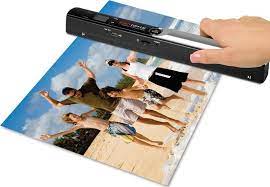
How to Process
Check the machine and remove asset tags
Storage media
Value Check
- Scrap Rules: The base scrap limit is $30; however, the scrap limit for some items varies based on size and salability. All larger printers (Any dimensions over 17″) must sell with shipping for over $100; otherwise, the item will be scrapped
- Sheetfed scanner uses the “Pre-Owned” listing; scrap value is $60.
- Sheetfed scanner –Inspect the scanner roller condition, and make sure is not melted. Leave the melted roller and use the ‘For Parts’ listing for the value check and mention it in the note.
- Make sure the listing model or part number exactly matches the item on hand. eBay will often ignore dashes or backslashes; it’ll also display random items, so it’s essential to ensure the correct item is selected.
- Use the ‘For Parts’ Listing when an item is missing important parts for testing.
- Choose the listing that has the same condition as the item on hand. (power supply, input/output trays, etc.)
Brand Specific
Fujitsu scanner
|


Note
- Leave a note for any difference between the listing and the item on hand.
- Leave a note if the price is converted.
Extra
- Check the roller and port condition.
How to Bag & Tag
Put Away
- Keep
- Leave it on the pending shelf at your workbench. The Quality Checker will QC them and put them in #1072 eBay Items For Resale
- Scrap
- #1005 SCRAP: PRINTER





One thought on “Scanner #10253”
READ