Last Updated on September 8, 2025 by
Introduction
This page provides guidance on how to handle 8th-gen or newer i-series CPU laptops and single-core laptops during processing, including value checks and putaway procedures.
If you have
- Multi-core CPU laptops refer to Laptops PC/Mac & All-In-One #6042
- 7th Gen or older i-Series CPU Laptops refer to Laptops, PC/Mac & All-In-One #6042
All laptops for this category will require a value check.
Item Examples
| Single-Core CPU Laptops
|
8th-gen or newer i-series CPU laptops
|

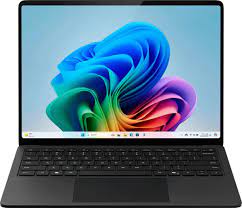
How to Process
-
Check the machine for asset tags
- Remove the asset tag and stickers from Single Core CPU laptops.
- 8th Gen or Newer CPU laptops
- Keep one asset tag if the laptop is from Inspiredu pickup
- Remove asset tag and stickers from other pickups.
-
Leave the hard drive with the unit.
-
Value Check the item
- Single Core Laptops
- Pentium I or Older
- All keep
- Damaged Screen, Keyboard, Or Hinges)
- Scrap
- Other
- Scrap value is $70 sold or $140 active.
- Choose the listing with the same CPU series.
- Choose the listing with a hard drive but no OS if available.
- Pentium I or Older
- 8th-Gen i series CPU laptops
- Choose the listing with the same CPU type(i3, i5, i7) and generation.
- Choose the listing with HDD and OS if available.
- Do not use the outliner listings.
- Single Core Laptops
-
Note
- Leave a note for any difference between the listing and the item on hand.
-
Extra
- Remove the bulging battery from the laptop.
- How to Identify CPU Types, Intel & AMD Case Stickers
-
How to Bag & Tag
-
Putaway
- Place laptops lid to lid and bottom to bottom to avoid scratches when put away.
- Use cardboard between layers when starting a new layer.
- Single-Core laptop:
- Keep: #1083 SINGLE-CORE LAPTOPS TO BE TESTED
- Scrap: #1077 SCRAP: LAPTOP
- 8th Gen or Newer i-Series CPU laptop/Microsoft Surface
- #1174: 8TH GEN & NEWER LAPTOPS VALUE CHECKED LAPTOPS

Records of Revisions
- — ZeDong: Updated post "Laptops To Be Value Checked: 8th Gen Or Newer & Single Core Or Older Laptops #12380"
- — ZeDong: Created post "Laptops To Be Value Checked: 8th Gen Or Newer & Single Core Or Older Laptops #12380"

read janna 12-23-25
READ
Read Edmundo Sanchez 03/03/2026
Read. CB.
read