Last Updated on June 2, 2026 by
You will be testing and dismantling Chromebooks as illustrated below.
Charge Chromebook for 5 min
Use AC adapter from Laptop USB-C AC Adapter Box.
Using DELL/HP/Lenovo USB-C AC adapter.
Reset Chromebook
Press Esc +⟳ +power button at same time.

Press Ctrl +D then hit Enter

Press Enter again

Wait Chrome Book to reboot.

Follow the start up process and connect Chromebook to “test Wi-Fi Network”

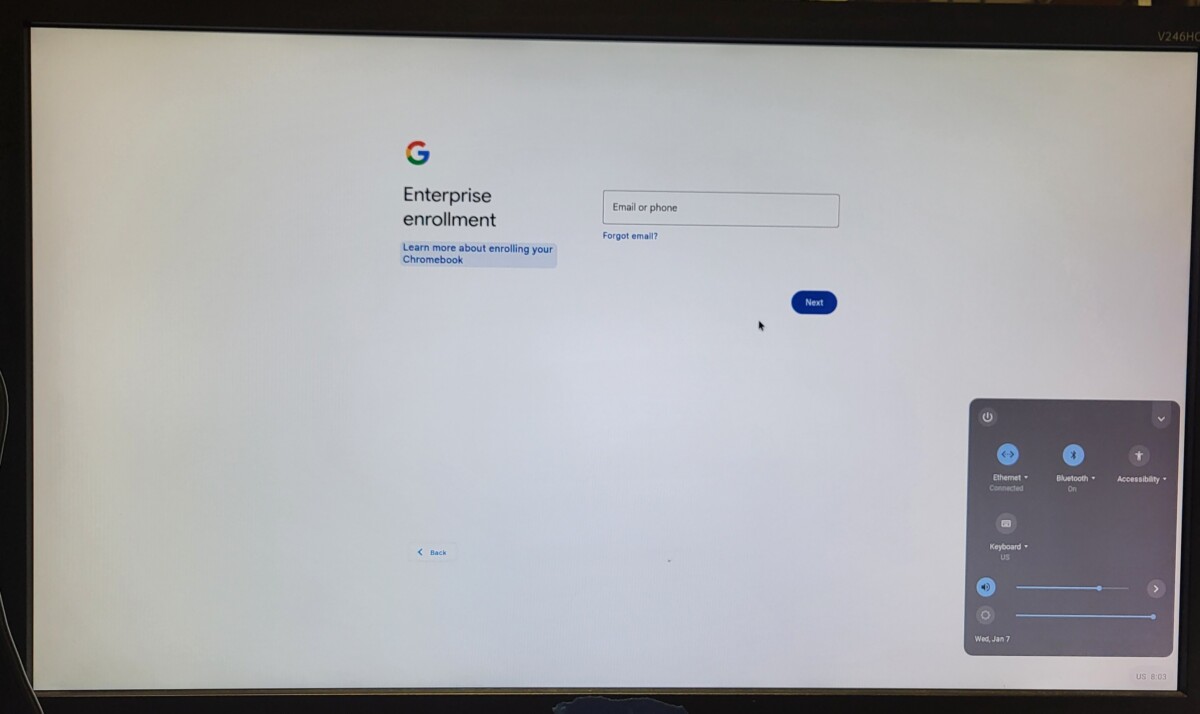
Base on different screen showed up to determine Chromebook is managed or not
- No Enterprise Enrollment (Not Managed)


- Enterprise Enrollment (Managed)


Revision by pctechlead@beyondsurplus.com edited at 2026-06-02 09:25:16

Records of Revisions
- — pctechlead@beyondsurplus.com: Updated post "PC Tech Level 2: How to reset Chromebook"
- — ZeDong: Updated post "PC Tech Level 2: How to reset Chromebook"
- — ZeDong: Created post "PC Tech Level 2: How to reset Chromebook"





Enoch Kim 3/10/25
read Lee Price 7/7/25
Read Edmundo Sanchez 04/27/2026